Getting Started
Welcome to the Smart Home Floorplan documentation!
The documentation will help you get started building your floorplan and connecting it to Home Assistant.
Home Assistant
Smart Home Floorplan works best with Home Assistant. This is a smart-home system that connects to your smart devices and allows you to observe and control them. Home Assistant does not have a solid floorplan visualization. This is where Smart Home Floorplan comes in.
Without Home Assistant, you can still build a floorplan, but you will not be able to populate it with live sensor data from your home.
If you want to tie in to sensors and don't already have Home Assistant, get started with Home Assistant, then come back here. 😀
Your Properties
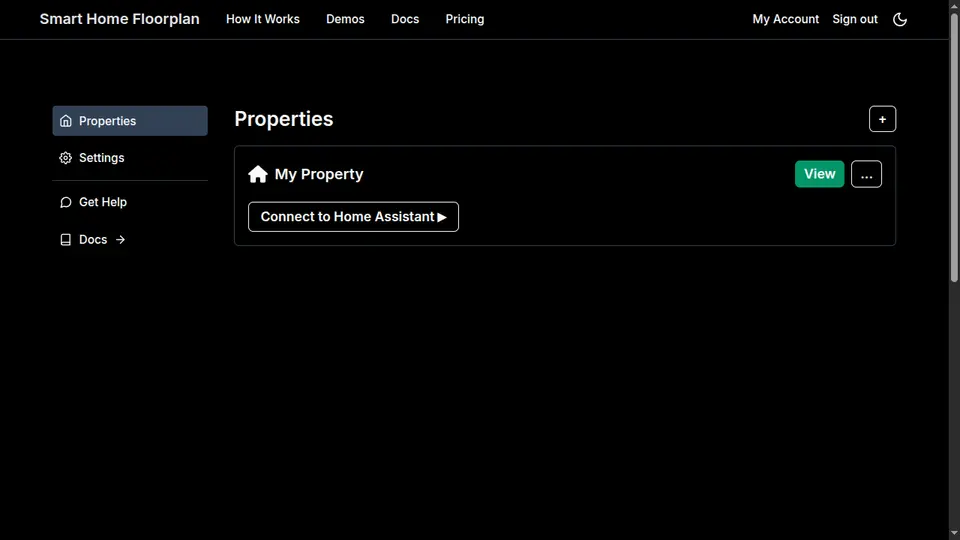
Once you sign up, you are taken to your account page, which you can see in the image below. Here you can edit settings (email, password, etc.), as well as access your properties. One is created for you by default.
To get into your floorplan immediately, click View. This will open the floorplan editor, and you can start building.
If you want to connect to Home Assistant so you can build with the sensors and devices you have in your Home Assistant instance, click Connect to Home Assistant.
This will show the propertyId and accessToken for your property that you need to connect Smart Home Floorplan to Home Assistant.
Show propertyId and accessToken
View your floorplan